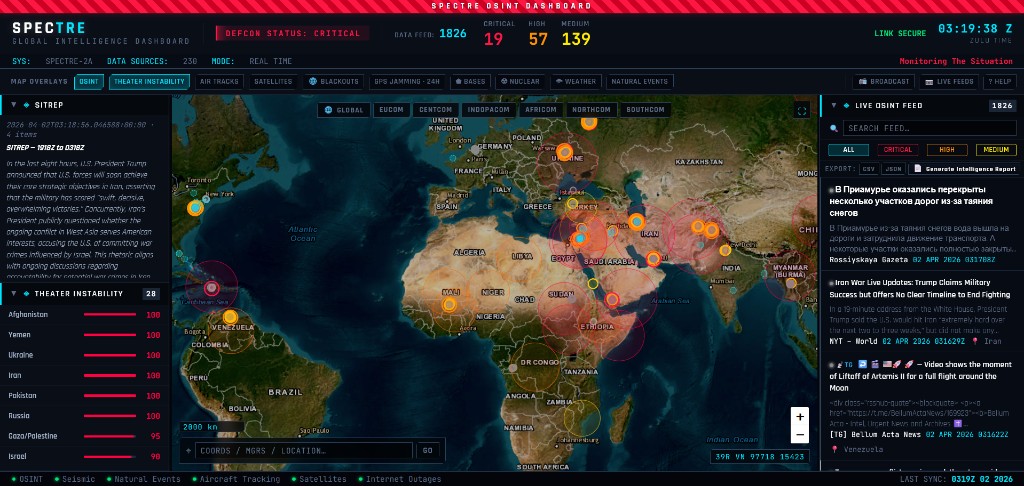
Why operators choose Spectre
Spectre is built for people who need speed, clarity, and defensible sourcing—not another pile of disconnected widgets.
Single-pane awareness
Replace tab-hopping across news sites, maps, flight trackers, and hazard feeds with one fused console. The map, feed, and side panels are designed to work together—not to compete for attention.
Decision-first ordering
Severity-ranked intelligence and consistent color coding push what matters most to the top. You see critical and high-signal items first, with recency respected inside each tier.
Fast when it counts
The interface is tuned for a quick return to usefulness after you open it: prioritized loading so the map becomes operational while deeper domains fill in behind the scenes, plus a warm state that makes repeat visits feel immediate.
Resilient by design
Upstream sources can hiccup. Spectre degrades gracefully—one failing feed does not collapse the whole dashboard—so you keep partial awareness instead of a blank screen.
Core coverage without paid data lock-in
The majority of intelligence streams run on curated free and public sources, so the product stays usable and transparent. Optional AI-generated narrative features (SITREP and intelligence reports) layer on when you choose to enable them.
Built for the watch floor
Header telemetry—including strategic alert posture, live feed counts, severity tallies, link status, Zulu time, and pipeline health—gives you at-a-glance confidence before you drill into detail.
Pricing & licensing
Spectre is offered through subscription and enterprise licensing. Pricing depends on team size, support posture, and integration scope. We keep commercial terms straightforward and aligned to mission use, not vanity seat counts.
- Subscription access for teams that need immediate capability with predictable monthly or annual terms.
- Enterprise licensing for larger programs that require governance reviews, custom integrations, and structured support.
- Program fit call to map your mission requirements to the right package before procurement.
For pricing details and procurement steps, use the contact channel below and we will provide the right package options.
One map, every layer that matters
Spectre centers on a live global map with intelligence overlays you toggle as the situation evolves. Layer buttons size to their labels and wrap cleanly on smaller screens; keyboard shortcuts (1-8) jump straight to key overlay groups for experienced users.
- OSINT pulse - Curated RSS and Telegram-sourced items with geo hints, plus GDELT conflict event points (combined under one OSINT control).
- Theater instability - Country-level risk context rendered on the map; click a country to filter the live feed to that theater.
- Air tracks & satellites - Military-focused flight tracking and propagated satellite positions for strategic awareness.
- Blackouts & GPS interference - Internet disruption alerts and GPS jamming cells (including a 24-hour jamming view).
- Strategic infrastructure - Military bases and nuclear facility references for geographic context.
- Weather & natural events - Live weather radar integration plus earthquakes and NASA-catalogued natural events under one natural-hazards toggle.
- Broadcast & live feeds - International radio streams and a curated index of public cameras for ground truth and ambient monitoring.
Map tools include search, regional quick-fly shortcuts, contextual actions, and fullscreen when you need the picture wall-sized.
Live OSINT feed: severity first, export-ready
The right-hand Live OSINT Feed is collapsible and always tied to what the classifiers see in the headlines-so operators spend less time sorting and more time deciding.
- Every item is scored from critical through info, sorted by severity with the newest items first within each tier.
- Multi-select filters for All, Critical, High, and Medium (OR semantics)-mix and match what you need for the moment.
- Full-text search across the feed when you are hunting a keyword, actor, or location string.
- Only high-integrity items make the cut: valid published timestamps required, and the dashboard emphasizes fresh reporting from the last 24 hours so the feed stays a live pulse, not a graveyard.
- Export the current filtered view to CSV or JSON for briefings, archives, or downstream tools.
- Generate a structured intelligence report from what is on screen, with history so you can compare narratives across moments.
- Context menu on each item: open the original source, copy a clean snippet, copy the URL, or fly the map to a tagged location.
Updates stream to your session in near real time-no manual refresh ritual to stay current.
Left column: narrative + theater context
The left stack splits attention between story and geography. Both panels collapse when you need more map real estate.
- SITREP - A concise, AI-generated paragraph synthesized from the highest-priority items (critical through info), time-stamped in Zulu so everyone shares the same clock.
- Theater instability - Sortable country risk rows; selecting a row filters the Live OSINT feed to that country so you can deep-dive one region without losing global context on the map.
How items are classified
Spectre applies a transparent, keyword-driven classifier to each headline and summary. Longer, more specific phrases win over vague matches; text is normalized so punctuation differences do not game the tiers.
- Severity - critical, high, medium, low, info. The strongest matching tier wins.
- Categories - conflict, terrorism, cyber, disaster, political, health, economic, nuclear, maritime, aerospace (multiple tags can apply). Categories drive map styling and visual consistency.
- Color mapping - Deterministic colors tie markers and list rows together so your eye learns the pattern once.
Headlines that do not match known crisis language may sit at info or low-an honest reflection of uncertainty, not artificial drama.
Intelligence domains & refresh cadence
Behind the UI, independent schedulers keep each domain on its own heartbeat. You get freshness without everything hammering the same clock cycle.
| Domain | What you see | Typical refresh |
|---|---|---|
| RSS OSINT | Curated global and security headlines | ~5 minutes |
| Telegram OSINT | Public channel mirrors with resilient fallbacks | ~10 minutes |
| Conflict events | GDELT conflict-coded activity | ~15 minutes |
| Seismic activity | USGS magnitude-threshold earthquakes | ~10 minutes |
| Natural events | NASA EONET open events (shared toggle with seismic) | ~15 minutes |
| Military flights | ADS-B derived military/government tracks | ~5 minutes |
| Satellite tracking | Two-line element propagation to positions | ~24 hours |
| GPS interference | Jamming and interference cells | ~30 minutes |
| Internet blackouts | IODA outage-style alerts | ~10 minutes |
| Strategic infrastructure | Bases and nuclear facility reference layers | Static reference |
| Broadcast radio | Curated international streams | On demand |
| Public cameras | Regional live camera index | On demand |
Onboarding & in-app help
First-time visitors get a guided walkthrough that tracks the live UI: header telemetry, layer bar and keyboard toggles, left-column workflow, feed filters and exports, toolbar tools, and status indicators.
- Press ? anytime for the help panel, platform reference, and shortcut list.
- Navigation shortcuts include full view, region presets, go-to search, and escape to clear overlays.
- Dedicated keys for broadcast radio and live camera tools; Alt+1-6 jump to theater-aligned map presets.
SD2 Industries & Spectre
Spectre is the flagship product experience for teams that need enterprise-grade OSINT workflows. For cyber threat-intelligence teams, SD2 also delivers Sentinel as a dedicated CTI operations platform. SD2 Industries is the corporate home for contracts, security review, custom programs, and long-term support-so your organization has a single accountable partner behind both products in production.
See the dashboard live, or contact us for enterprise licensing, integrations, and program-level questions.
Features, layers, and data sources described on this page are subject to change as Spectre evolves.